


1800 Contacts - Lens Store
4.613.61K Reviews
App Specs
- Version
- 11.4.4
- Updated On
- License
- Free
- Downloads
- 1,000,000+
- Developer
- 1-800 CONTACTS
- Categories
- Medical
- Platform
- Android, iOS
Screenshots
 Analysis by AppCompare
For people who rely on contact lenses, convenience can mean more than saving a trip: it can mean avoiding a last-minute scramble when supplies run low. I find 1800 Contacts - Lens Store most useful as a shopping app built around a specific recurring need, rather than as a general health tool. Its focus is practical: help lens wearers find their familiar products and manage repeat purchases from a phone.
Readability and finding the right lenses
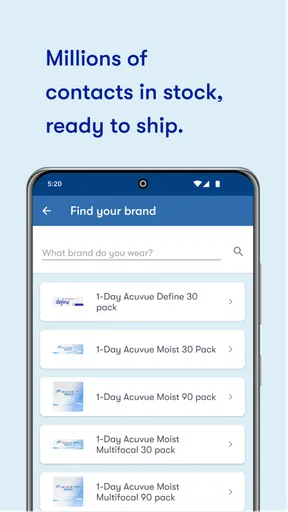
When I’m considering a lens-ordering app, I want the essential task to feel straightforward: identify the product I already wear, then work through the purchase without unnecessary searching. This app’s product search and box-scanning option speak directly to that problem. If I have the packaging nearby, scanning can be a useful shortcut; if I don’t, searching by brand gives me another route. Neither approach replaces checking the prescription details, but together they can reduce the chance of choosing a similar-looking product by mistake.
The distinction matters for people who have trouble reading small packaging or remembering a lens’s full product name. A scan may help avoid typing a long name, while searching remains useful when the box is unavailable. I would still take a moment to check the selected lenses against my current prescription before ordering. A convenient shortcut is most helpful when it supports a careful choice, not when it encourages a rushed one.
There is also a trade-off in putting shopping, prescription handling, and repeat-order tasks in one place. For an established wearer who knows what they use, that can make routine purchases easier to manage. Someone comparing lens types for the first time may need more explanation than a shopping flow is designed to provide. I would treat the app as a way to order an existing prescription, not as a substitute for professional advice about which lenses are suitable.
Motor and sensory considerations
Phone-based ordering can be helpful when visiting a store is inconvenient, but it is not automatically easier for everyone. Small touch targets, screen glare, typing, and camera alignment can each create friction depending on a person’s vision, dexterity, device, and surroundings. The scanning option may spare some typing, but it still depends on having the box available and being able to position it for the camera. If that step becomes awkward, a text search or another way of placing an order may be more comfortable.
I would also separate visual comfort from product access. A person can find an app’s layout easy to follow and still need help confirming prescription information or completing a purchase. If reading on a phone is tiring, using the device’s own display and text settings may make a session more manageable, although the precise options depend on the phone. Taking the order in stages—first find the product, then review the prescription and purchase details—can also be easier than trying to do everything quickly.
For someone who prefers spoken assistance, the app’s customer-support routes may be a more suitable part of the experience than navigating every step alone. That does not mean support replaces accessible controls or guarantees that every issue can be solved immediately; it simply gives users another way to ask a question when a screen-based task is not working for them. I’d use that route for a specific ordering concern rather than guessing at an unfamiliar lens choice.
Worth Reading Before You Choose

EA SPORTS FC Mobile 26 Is a Bigger Football Game, but It Takes Time

Flipboard Shows What News Apps Must Do Beyond the Feed

Switching to Android Auto Means Rethinking Your Driving Routine

Google Calendar Makes a Crowded Week Easier to Manage

Ludo King Makes the Most of the Minutes Between Plans

Baby Panda World Brings Quick Play to Modern Phones, but Its Game Library Feels Busy
Situational access: keeping a routine on track
A realistic use case is the person who notices during a weekend trip that they packed fewer lenses than expected. If the product is already familiar and the prescription information is in order, being able to search or scan from a phone may make it easier to start a reorder without first returning home to find paperwork. It is still wise to check delivery timing and the order details before relying on a new shipment; an app can help organize a purchase, but it cannot make a delivery arrive instantly.
Reminders can be useful for another common situation: a busy household where lens supplies compete for attention with work, school, and errands. I would treat a reorder alert as a prompt to check the drawer, not as proof that a new order is needed. People use lenses at different rates, and travel or changes in routine can shift when supplies run low. A quick inventory check before reordering helps avoid both a shortage and an unnecessary purchase.
The service can also suit someone who has difficulty getting to a physical retailer or would rather handle a repeat purchase at home. Compared with calling a store or making a dedicated trip, an app can keep product search and account tasks within reach. Compared with buying from a broad online marketplace, a lens-focused retailer may feel more direct for shoppers who already know their brand and prescription. For an in-person fitting, a new prescription, or advice about eye discomfort, a qualified eye-care professional is the better choice.
Where convenience has limits
Ordering contacts is not the same as receiving medical care. A reminder, saved prescription, or easy reorder can support a routine, but it should not encourage anyone to keep wearing lenses beyond professional guidance or to ignore changes in comfort or vision. If a prescription has changed, I would make sure the information used for the order is current. If my eyes felt uncomfortable, I would seek appropriate eye-care advice instead of treating a shopping app as a diagnostic tool.
Another practical limit is that mobile ordering depends on having enough information to make the right selection. A familiar box can help identify a product, but packaging and prescription details deserve a final check, especially when ordering for more than one wearer or after a prescription change. I would avoid placing an order from memory if I were unsure about the exact lens. A short pause to confirm details is more valuable than saving a few taps.
The app is free and is made by 1-800 CONTACTS, a company focused on contact-lens shopping. It has a 4.6 average from around 32,000 ratings, while more than a million installs suggest that many people use it. Those figures can help set expectations about its reach, but they do not tell me whether its ordering flow will suit a particular user’s needs or device. I’d judge it by whether it makes my own repeat-order routine clearer and less stressful.
A Seamless Shopping Experience
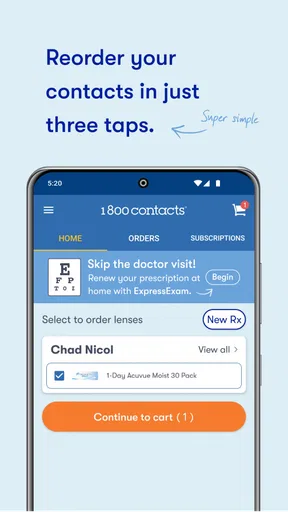
First off, the user interface is sleek and intuitive. When you open the app, you’re greeted with a clean, easy-to-navigate layout that makes ordering contact lenses as simple as a few taps. Whether you’re tech-savvy or not, finding your way around 1800 Contacts - Lens Store is a breeze.
One thing I love is the search functionality. You can search for your brand of lenses by name or even scan your prescription box. Yes, you heard it right – the app uses your phone’s camera to scan the barcode on your current lens box and automatically pulls up the exact product. It’s like having a personal shopper right in your pocket.
Prescription Management Made Easy
Managing your prescription is another area where this app shines. You can upload your prescription directly through the app, and it’s stored securely for easy reordering. If you don’t have a copy on hand, no worries – they’ll even contact your eye doctor to get it for you. Talk about convenience!
Plus, there’s a handy reminder feature that alerts you when it’s time to reorder. Say goodbye to those days of suddenly realizing you’re down to your last pair. The app takes care of it, ensuring you’re always stocked up.
Deals and Discounts Galore
Who doesn’t love a good deal, right? 1800 Contacts - Lens Store often features promotions and discounts that are hard to pass up. I’ve seen offers like discounts on bulk orders or special deals for first-time users. Keeping an eye on these can save you a decent chunk of change, which is always a win in my book.
The app also offers a price-match guarantee. If you find a lower price somewhere else, they’ll match it. It’s reassuring to know you’re getting the best possible price without having to shop around endlessly.
Customer Support at Your Fingertips
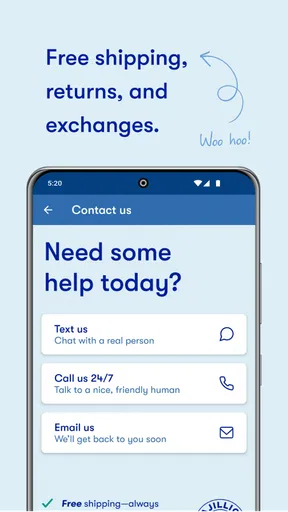
Let’s talk customer support. The app offers 24/7 customer service via chat or phone, which is perfect for those unexpected issues that can crop up. I had a minor question about my order status, and their team was quick to respond and super helpful. It’s clear they prioritize customer satisfaction, which is always a plus.
Moreover, if your prescription changes, returning the unused lenses is hassle-free. They offer free returns, no questions asked. It’s this level of service that sets them apart from the competition.
Conclusion: A Must-Have App for Lens Wearers
All in all, 1800 Contacts - Lens Store is a must-have app for anyone who relies on contact lenses. It combines convenience, cost-saving, and customer-centric features that simplify the lens-buying process. Whether you’re a long-time contact lens wearer or new to the game, this app is designed to make your life easier.
From the seamless ordering process to the unbeatable customer support, it’s clear why this app stands out in the crowded marketplace. So, if you’re tired of the usual hassle of buying contacts, give this app a try – your eyes (and wallet) will thank you!
Who will benefit most, and who may prefer another route?
I think the best fit is a person who already wears a known lens brand, keeps an eye on supplies, and wants a convenient way to repeat an order. The app is also worth considering if you prefer handling a routine purchase from home rather than building a separate trip around it. Its medical category can be a little misleading if read too broadly: it helps with contact-lens shopping, but it is not a replacement for an eye exam, fitting, or a conversation with an eye-care professional.
Someone new to contacts may find a retailer’s ordering tools less useful than in-person guidance, especially when deciding between lens types or learning how to use them safely. Likewise, if I needed a product immediately, I would compare the likely delivery timing with nearby retail options rather than assume an online order would solve the problem. The app is strongest when there is enough time to confirm the product and plan a reorder.
For people who rely on assistive technology or have specific accessibility needs, I would try the tasks that matter most before depending on the app for a time-sensitive order: search for a product, review the prescription details, and locate a way to get help. A smooth experience for one person does not guarantee the same experience on every phone or for every ability. If any part of that flow is difficult, using customer support or choosing a retailer whose ordering process better fits your needs is a sensible alternative.
Small habits that make ordering more reliable
One useful habit is to keep the lens box until the next order is complete. That gives me something concrete to scan or read, rather than relying on memory when several similar products are involved. I would also compare the selected product with the prescription before checking out, then make a separate note of when I should review my remaining supply. That simple routine makes the reminder more meaningful: it becomes a cue to check stock, not an automatic instruction to buy.
If I’m ordering for multiple people, I’d handle each wearer’s product as a separate task and verify the details before moving on. That reduces the chance of mixing up familiar-looking packages or saved information. If a prescription has changed, I would pause the routine order and make sure the new details are the ones being used. These checks take a little extra time, but they matter more than shaving a few seconds off the process.
The app is rated for Everyone, has been available since March 15, 2013, and its current version is 11.3.4, with Android 8.0 as the minimum operating-system requirement. I see those as practical compatibility details rather than a guarantee that every feature will work identically across devices. Before building a regular routine around any app, I would make sure it runs comfortably on my phone and that its text, controls, and support options are usable for me.
An inclusive verdict for a focused shopping tool
My overall view is that this is a practical option for established contact-lens wearers who value repeat ordering and want product-finding tools close at hand. Search, box scanning, prescription handling, reminders, and support can each reduce a different kind of friction, especially when used thoughtfully rather than as a substitute for checking details. The app’s usefulness depends less on flashy extras and more on whether those steps fit the way someone manages lenses.
Its limits are just as important to recognize. It is not the right place to resolve eye symptoms, choose a lens without professional input, or assume that an order will arrive in time for an urgent need. People who find phone navigation uncomfortable, need hands-on assistance, or prefer to speak with a local retailer may be better served by another route. I would recommend trying it for a routine purchase if its interface works for you, while keeping an eye-care professional involved in decisions about vision and lens suitability.
Pros
- Easy-to-navigate interface.
- Quick and simple ordering process.
- Wide selection of contact lenses.
- Fast shipping options available.
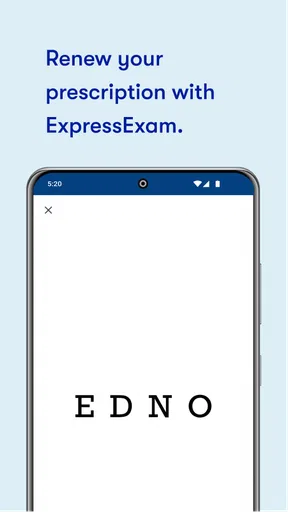
- Convenient prescription renewal.
Cons
- Limited international shipping.
- Occasional app glitches reported.
- No in-app customer support chat.
- Requires account for browsing lenses.
- Limited deals and discounts.
FAQs for 1800 Contacts - Lens Store
What features does the 1800 Contacts app offer?
The 1800 Contacts app provides a convenient platform to order contact lenses with ease. Key features include a simple reorder process, vision prescription upload via photo, a virtual try-on tool for frames, and 24/7 customer support. Additionally, users can track orders and receive reminders for reorders, ensuring a seamless experience.
Is the 1800 Contacts app available for both Android and iOS devices?
Yes, the 1800 Contacts app is available for both Android and iOS platforms. Users can download it from the Google Play Store for Android devices and the Apple App Store for iOS devices, ensuring accessibility across a wide range of smartphones and tablets.
How does the prescription upload feature work in the app?
The prescription upload feature allows users to take a photo of their eye prescription and upload it directly to the app. This eliminates the need for manual entry and ensures accuracy. The app verifies the prescription with your eye doctor, streamlining the ordering process and saving time.
Can I track my order through the 1800 Contacts app?
Yes, the app provides real-time order tracking. Once you've placed an order, you can monitor its status directly within the app. This includes updates on processing, shipping, and delivery, allowing you to stay informed about when your contacts will arrive.
What if I need help or have questions while using the app?
The 1800 Contacts app offers 24/7 customer support to assist with any inquiries or issues you may encounter. You can reach out to their support team via chat or phone call directly from the app, ensuring you receive timely assistance whenever you need it.


